Events 0
En
Ua
Events 0
Search result:
Follow the Adversary: The Top 3 Red Team Exploitation Paths from 2024- image 1

Follow the Adversary: The Top 3 Red Team Exploitation Paths from 2024

Despite the fact that 2024 has already passed, many of last year’s threats and vulnerabilities still remain relevant. Thanks to CrowdStrike Professional Services Red Team, all these threats are carefully monitored, and companies remain protected from adversaries.

Here are the three most common uses of the Red Team encountered by the CrowdStrike team:

  1. Unprotected credentials: Weak or unprotected credentials remain one of the easiest ways for adversaries to gain access to data.
  2. Abuse of Active Directory Certificate Services (AD CS): Misconfigurations in AD CS provide adversaries with almost instant paths to escalate to domain compromise. These attack paths, often referred to as numbered escalation paths, can lead to immediate domain compromise under certain circumstances.
  3. Excessive permissions in Active Directory: This is another of the most common issues that is difficult to address in complex environments. Overly broad access rights allow adversaries to stealthily obtain necessary data.

In this blog, we will examine three critically important usage paths, detail how they arise, and show how companies can reduce their vulnerability.

Follow the Adversary: The Top 3 Red Team Exploitation Paths from 2024 - image 1

Usage Path 1: Unprotected credentials

Unsecured credentials remain a persistent problem. For Red Teams (and adversaries), it is much easier to break into a house when the keys are left under the doormat. Here are the reasons why this issue still exists:

  • Teams do not have access to a dedicated password management solution, so they use a shared spreadsheet for shared credentials (for example, a shared external billing account).
  • Administrators need to perform the same task repeatedly across multiple hosts, so they store PowerShell scripts in a shared repository where they can be quickly retrieved and executed. These scripts contain hard-coded credentials instead of prompting for them.
  • Backups of deployed code, including internal web servers, are stored in a shared development team folder that any authorized user can access. The code uses hard-coded credential values or keys instead of variables, exposing secrets in plain text.
  • Individual users back up their “Desktop” or “Documents” folders to a shared drive and develop the unfortunate habit of adding files such as “passwords.txt” or “reminders.docx”.

SharePoint is one of the places where credentials can accidentally be exposed. If a company uses Microsoft Teams, files shared in “channels” (rather than in one-to-one direct messages) can become accessible to the entire team due to their linked nature. These files can be found under the “Files” tab in the “Attachments” folder. Someone may share a sensitive file containing credentials, believing it is restricted to a specific group within Teams, when in reality the file may be accessible to anyone in SharePoint if it is not properly locked down.

So where were these credentials found? As you might expect from the examples above, the primary sources this year were SharePoint, network file shares, and code repositories. Process management tools such as Jira also received an honorable mention, as people correctly updated project management tickets but included configurations or passwords as part of those updates. Other common places where credentials are hidden include deployment histories (Azure, Jenkins, and others) and runbooks (Azure, Terraform, Ansible, and similar tools).

Potential measures to reduce credential exposure

Managing credentials may seem overly complex at first, but over time it can become more manageable. CrowdStrike recommends the following measures:

  • Implementing an appropriate (and secure) password management solution
  • Running regular scans of network resources and SharePoint using tools such as Snaffler
  • Providing user training, especially for developers and IT staff who tend to write scripts or code with embedded service account credentials
  • Using secret-masking functionality in automation (for example, vaults in Ansible)
  • Reviewing code before commits and supplementing reviews with repository scanning tools such as TruffleHog

These steps do not fully eliminate credential exposure, as credentials should never be stored in plain text, and access controls for shared network resources must be reviewed. Large built-in groups such as Authenticated Users often have access to more resources than intended, as resource usage evolves over time or environments are configured quickly. The Snaffler tool can also be used to identify shared resources without digging through files, enabling faster discovery.

Usage Path 2: Active Directory Certificate Services (AD CS)

Those who abuse AD CS almost immediately regret it, as the attack paths—often referred to by shorthand names of numbered escalation variants (ESC1, ESC4, and so on)—can lead to instant domain compromise under certain conditions. Unfortunately, this happens very frequently.

As the name implies, AD CS manages the issuance of cryptographic certificates and public key infrastructure (PKI) within an Active Directory environment. When combined with Public Key Cryptography for Initial Authentication (PKINIT), these certificates can be used with Kerberos to authenticate as a principal user without a password.

Even if PKINIT is not enabled in the environment, certificates can still often be used to authenticate to other protocols, such as Lightweight Directory Access Protocol (LDAP) over TLS. This can lead to secondary attacks, including the configuration of Resource-Based Constrained Delegation.

Of all the escalation paths CrowdStrike has observed in its operations, ESC1, ESC4, and ESC8 are the most commonly abused by adversaries.

ESC1

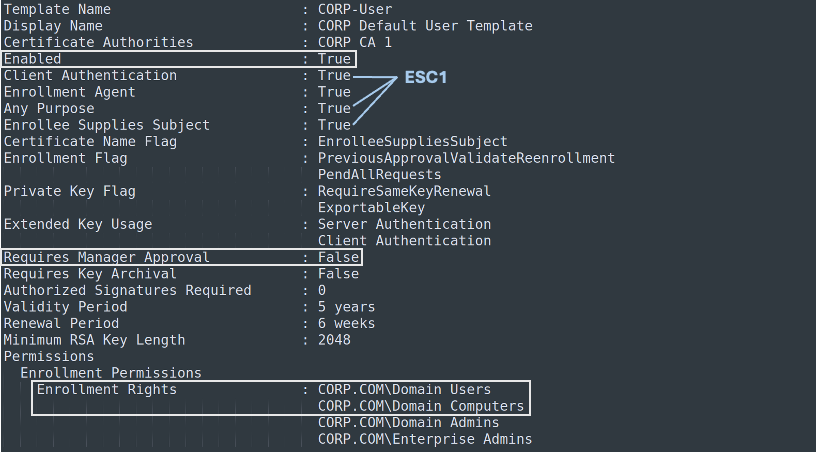
This attack path involves configurations that allow an attacker to request a certificate with a specified additional identifier, enabling them to impersonate a target account. The vulnerable combination of settings for this attack path includes:

  • Large built-in groups (typically Domain Users, Domain Computers, or Authenticated Users) are allowed to enroll using the template and certification authority.
  • Manager approval is disabled, although this is not a decisive factor if some social engineering or luck is involved (for example, inattentive managers).
  • The target certificate template is enabled.
  • Extended Key Usage (EKU) is set to a value that allows some form of Kerberos authentication (for example, Client Authentication), EKU is set to “Any Purpose,” or no EKU is specified at all.
  • The certificate template is marked with ENROLLEE_SUPPLIES_SUBJECT, allowing the requester to specify an additional subject attribute when requesting a certificate.

When these conditions are met, a user can specify the name of a domain administrator or a domain controller and obtain full Kerberos authentication without knowing the password.

When using the open-source Certipy tool to enumerate AD CS, the template shown below would be vulnerable to ESC1.

Follow the Adversary: The Top 3 Red Team Exploitation Paths from 2024 - image 2

It is worth noting that even if a certificate cannot be requested by these large built-in groups, it may still provide a path—albeit a slightly longer one—to domain privilege escalation. This occurs when non–Tier 0 principals are able to enroll in a vulnerable template. For example, it is often observed that individual servers have enrollment permissions on vulnerable templates, which adversaries later abuse to compromise the domain after obtaining local administrator privileges on those servers.

Mitigation: To protect against ESC1, ensure that certificate templates do not include the ENROLLEE_SUPPLIES_SUBJECT flag. If other deployed technologies absolutely require subjects to supply an alternative subject name, ensure that enrollment permissions are restricted and denied to high-privilege groups such as Domain Admins and Domain Controllers. If this is also not feasible, consider requiring manager approval for certificate requests to help identify illegitimate use.

It is also advisable to review templates where “Any Purpose” is specified or where no EKU is defined at all. In general, “Any Purpose” and missing EKUs should be adjusted to support only the limited set of usages required for that certificate.

ESC4

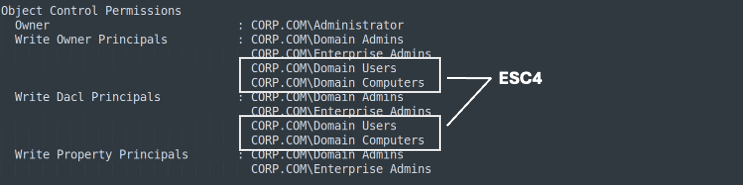
Certificate templates are Active Directory objects, like everything else in that environment, and ESC4 abuses misconfigured access control entries (ACEs) on those templates. With the ability to modify a template, an adversary can intentionally make it vulnerable by applying the settings described above for ESC1.

When enumerated again using Certipy, the template shown below would be vulnerable to ESC4.

Follow the Adversary: The Top 3 Red Team Exploitation Paths from 2024 - image 3

Mitigation: ESC4 follows a more traditional approach. Because template owners/authors can escalate to Domain Admin by modifying a template, permissions on template objects must be reviewed, and ownership and other write permissions should be restricted to Domain Admins wherever possible. Tools such as Certipy can help identify these owners, as can traditional Active Directory reconnaissance tools like BloodHound.

ESC8

Rather than abusing a template, ESC8 abuses the web enrollment capability on the certification authorities themselves. The CA web enrollment service allows users to perform certificate-related tasks through the CA web user interface by accessing the endpoint http(s)://ca-name.example.com/certsrv.

While this functionality can be useful for non-technical users, it can also be abused via NTLM relay attacks.

SMB and LDAP signing are defensive options that can prevent NTLM relay attacks against those respective services, but ESC8 targets the HTTP service, which is not protected by these controls.

After successfully completing authentication through an adversary-in-the-middle, the attacker can use the resulting session with tools such as Certipy or ntlmrelayx. This is done to automatically request a certificate for any template the victim is allowed to use and can lead to outcomes such as authenticating as the victim account or abusing other vulnerable templates that are not broadly accessible. If the victim is a domain controller, full domain compromise typically follows shortly thereafter.

Mitigation: For ESC8, consider fully removing the web enrollment service. If the service is still required, Microsoft has provided additional protection through Extended Protection for Authentication (EPA). It is also necessary to require HTTPS for access to the web enrollment endpoint to enforce a TLS tunnel, and to further restrict credential relay, NTLM authentication should be disabled for Internet Information Services (IIS) on the certification authority. For additional details on these defensive measures, refer to Microsoft documentation.

NTLM Relay Attacks

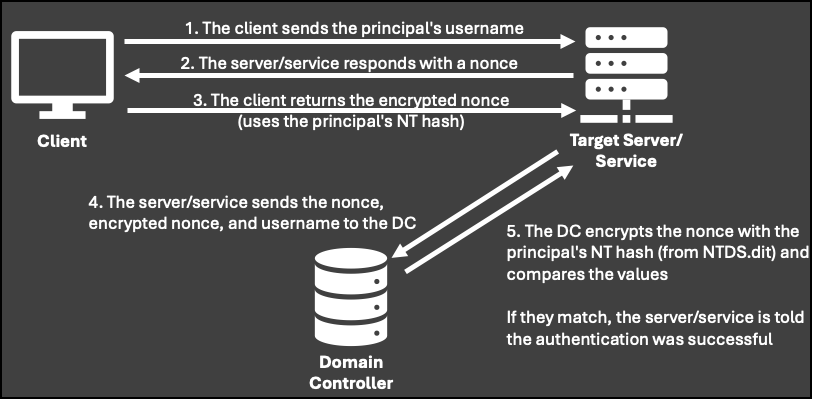
The NTLM authentication protocol uses a challenge-response flow in which the account password hash is used to encrypt a number that is used only once (a “nonce”). The client receives the nonce, encrypts it using the account password hash (the NT hash), and returns it to the service. The service then forwards the username, the nonce, and the client’s encrypted response to the domain controller. The domain controller retrieves the password hash for the specified username, encrypts the same nonce, and compares it with the encrypted value provided by the service. If the values match, the account is successfully authenticated.

Follow the Adversary: The Top 3 Red Team Exploitation Paths from 2024 - image 4

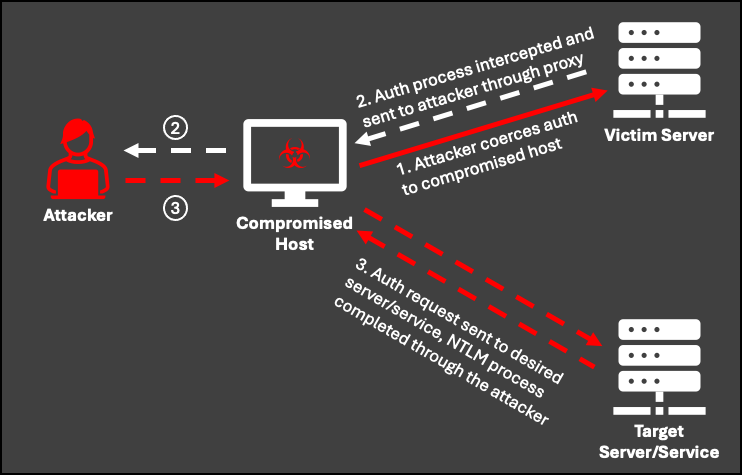
Using an NTLM relay attack, an adversary positions themselves in the middle of the authentication process, where they can intercept and/or deliberately coerce authentication and then relay it to a destination of their choosing. This typically requires access to port 445 and a series of tunnels. Port 445 is automatically bound by the SYSTEM account at startup on Windows hosts, which makes local administrative access a prerequisite for most NTLM relay attacks in heavily Windows-centric environments.

In a coercion scenario, the victim server is forced to authenticate to a compromised host. However, the attacker intercepts the first step of the authentication process and instead forwards it to a target server or service, initiating authentication there. The adversary-in-the-middle then manages the remaining NTLM back-and-forth until completion. Once the flow is complete, the attacker controls the authenticated session.

Usage Path 3: Excessive permissions in Active Directory

Excessive permissions in Active Directory are another long-standing issue that can be difficult to fully eliminate in complex environments due to the large number of moving parts. This problem is further complicated by the fact that it often arises from multiple causes, such as insufficient policies or lack of enforcement, as well as the constant tension between convenience and security.

CrowdStrike Professional Services Red Team frequently encounters misconfigured, forgotten, or over-permissioned objects that allow us to hop, skip, and jump our way to full control of an environment.

Over-permissioned accounts

This issue has appeared in the majority of environments tested by the CrowdStrike team. Service accounts that are members of Domain Admins or equivalent groups represent one of the biggest problems. The challenge is that service accounts often need to be widely distributed across the environment to perform their functions. In addition, they account for the largest share of credentials found in unsecured locations. Even if they are not discovered on a file share, credentials can often be obtained through Kerberoasting or extracted from a host registry—if the account runs as a service on that host.

However, Domain Admin privileges are not the only risk—service accounts can also be used as a stepping stone to local administrator access on servers that expose additional attack paths.

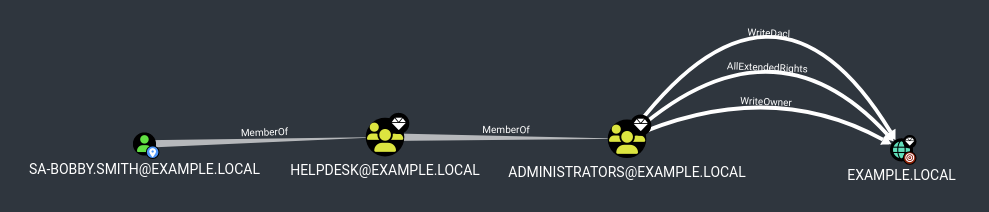
Another major contributor is helpdesk administrator accounts, which can ultimately lead to full domain compromise. Nested group memberships in Active Directory are commonly observed, leading to built-in Domain Admin groups or to accounts that have the ability to modify other principals, resulting in potential domain compromise.

Insufficient account tiering

Without going into excessive detail, assets in a network can often be represented as tiers, where Tier 0 is the domain itself and the principals that can manage it (for example, Domain Admins and Domain Controllers). Tier 1 typically includes most other servers and their administrators, Tier 2 generally consists of helpdesk administrators and supporting infrastructure, and Tier 3 covers everything else.

While many organizations are improving the separation between administrative accounts and standard user accounts, CrowdStrike Professional Services Red Team frequently finds that there is no further tier separation for administrators, particularly between Tier 0 and Tier 1/2. This means that accounts with full domain control log into workstations and file servers, where their credentials may be accessible in LSASS, or leave behind stale RDP sessions that can be hijacked. This is more complex and noisier to exploit, but it remains a significant issue.

Misconfigured and forgotten access control permissions

Another common Red Team finding is a group of domain users that has access rights such as AllExtendedRights, WriteDacl, or GenericAll on multiple computer objects, and sometimes even on other user objects.

Even worse, computer objects may not correspond to a server that is actually reachable on the network. However, if the object has not been removed from Active Directory, adversaries can abuse these permissions to take ownership of it. This can lead to follow-on attacks to access other resources or to enroll in AD CS, such as access control chaining.

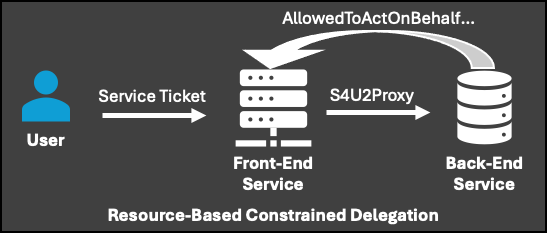
The two most common abuse paths for misconfigured ACEs on computer objects are shadow credentials and Resource-Based Constrained Delegation (RBCD). These can be exploited when domain users have AllExtendedRights, GenericAll, GenericWrite, WriteDacl, or Owner permissions on a computer object.

The first option, shadow credentials, requires one of two conditions: 1) PKINIT is enabled for authentication, or 2) LDAP over TLS is available. An attacker writes new credentials to the msDS-KeyCredentialLink attribute of the object, adding a passwordless authentication mechanism for that object.

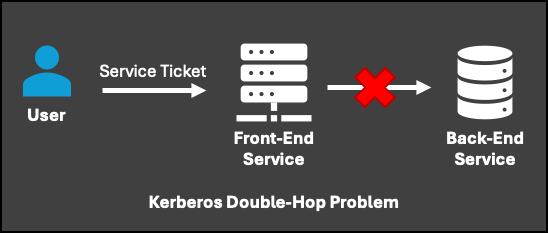
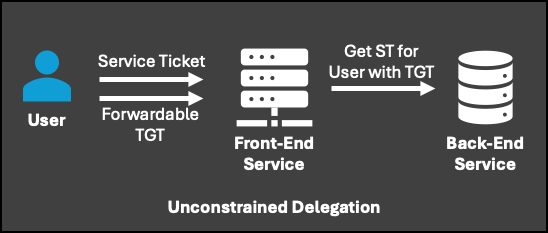
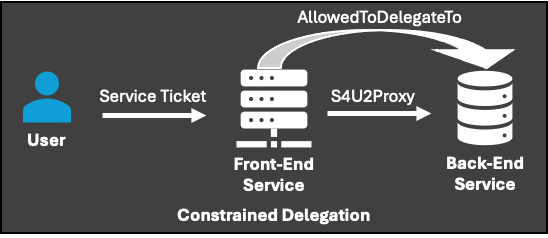
RBCD is slightly more complex. The Kerberos authentication protocol uses tickets to access services across the environment. When a user wants to access a web server, they obtain a service ticket for the HTTP service and present it. However, if that service needs to access an internal database to retrieve information for the user, the provided service ticket does not cover that access. This results in the classic double-hop problem.

Follow the Adversary: The Top 3 Red Team Exploitation Paths from 2024 - image 6

Summary

While specialists regularly encounter (and abuse) other things like weak SCCM implementation or lack of LDAP signing, addressing these three issues will greatly improve the overall security posture of the corporate network and force the Red Team (or real attackers) to sit up and strain to dig deeper.

These issues are common year after year, so prioritizing them in 2025 is crucial for most companies.

NEWS

Current news on your topic

All news
All news